Robert Fassbender's blog

Which States Offer the Highest HOMES and HEAR Rebates?

Posted on: May 4, 2026

Which States Offer the Highest HOMES and HEAR Rebates?

Some states are now offering very large residential energy rebates under the Inflation Reduction Act. In a few cases, combined HOMES and HEAR incentives can reach up to $34,000 per residence, depending on the state, income level, project scope, and savings pathway.

I put together the map below to make it easier to compare the top states, including program status, maximum rebate amounts, multifamily availability, and where energy modeling may help unlock larger incentives.

What This Map Shows

The map highlights selected states with notable HOMES and HEAR rebate opportunities. It includes estimated maximum rebate levels, whether multifamily projects are currently a good fit, and whether energy modeling is likely to be required, helpful, or less important.

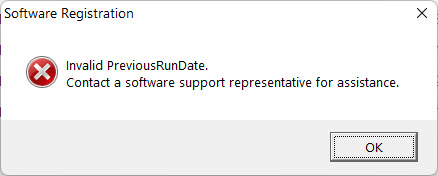
Fixing the eQUEST Error: Invalid PreviousRunDate. Contact a software support representative for assistance

Posted on: December 18, 2025

Fixing the eQUEST Error: “Invalid PreviousRunDate. Contact a software support representative for assistance.”

If eQUEST displays the message:

“Invalid PreviousRunDate.
Contact a software support representative for assistance.”

it means the INI file for your eQUEST installation has stored a corrupted
Status and Special value. This usually happens when eQUEST crashes,
fails to shut down cleanly, or can’t complete a write to the INI file.

Below are two ways to fix it.


Fix 1 — Permanent Solution (Recommended)

Replace the Status/Special lines and make the INI file read-only

  1. Locate the INI file for the version you are running.Most users will find it here:
    C:\Users\Public\eQUEST 3-65-7175 Data

    If you have older or alternate installs, also check:

    C:\Users\<YourUser>\Documents\eQUEST 3-65 Data
  2. Open the INI file in a plain text editor (Notepad or Notepad++).
  3. Find and replace the corrupted lines that look like this:
    Status=XXXX
    Special=XXXX

    Replace them with a known valid pair. The following works reliably on many 3-65 installs:

    Status=1000
    Special=891389201
    
    (if this doesn't work, find an unused eQUEST.ini on your computer and copy the values)
  4. Save the file.
  5. Make the file read-only so eQUEST can’t corrupt it again:

10 Energy Modeling Jokes and Memes featuring ChatGPT

Posted on: November 10, 2023

Recently, someone used ChatGPT to create 10 Energy Modeling jokes and challenged someone to create better jokes

As the funniest person in the industry, definitely the only instructor with a sense of humor, I am obligated to accept the challenge.

For years, I have collected memes regarding energy modeling and performance design. I will start sharing them if this gets enough views.

There are many people in this industry who frown upon humor and are cynical about everything (I’m definitely not talking to you IESVE). I'll get some disparaging comments about various things.

Lucky for me, people want an instructor with a sense of humor!

(Edit in Bold) Industrywide: Maybe if we could loosen up, we could attract some talent? And keep it?

How to fix the Weather file missing error in eQUEST

Posted on: March 29, 2023

Weather File Missing Error eQUEST

(You'd already know this if you went through our eQUEST online training program!)
Typically, default eQUEST locations install automatically, but lately, they do not, which causes an error.

The error states: The following weather file is required to perform the simulation for the selected location but was not found.

We will present multiple solutions, but first, let's note that the error looks like this:
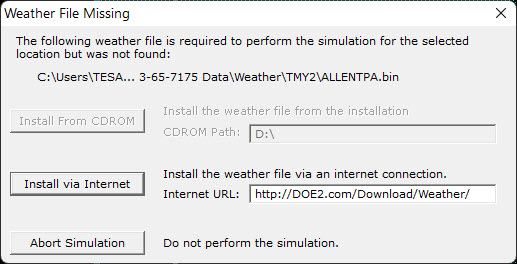
The following weather file is required to perform the simulation for the selected location but was not found.

The "install via internet" button will not work, but you can try it.

Solution Number 1: Download the weather file from the source

The easiest solution is to quickly download the file yourself and place it in the proper directory.

Step 1: Note the File type and the file name:

Here we see that the file type is TMY2, and the name is ALLENTPA.bin
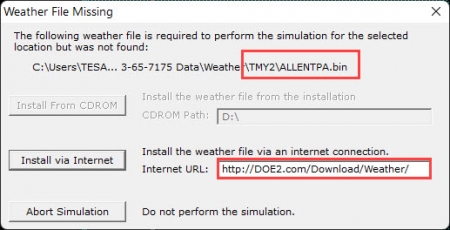
eQUEST weather file missing

Step 2: From the image above, note the default directory

From the error message, next to the file name and TMY2, we can see that the default directory for this file is in the "...3-65-7175 Data" folder, then the TMY2 folder.

Step 3: Download the file from the source

Building Commision part 2 - A simple case study

Posted on: March 24, 2023

In one case study, building commissioning saved a building owner 36% on an annual energy bill of $550,000. large commercial building in a major metropolitan area. The building was constructed in the 1980s and had not undergone any significant upgrades since then. The building owner was interested in reducing energy costs and improving tenant comfort, so they hired a commissioning agent to evaluate the building's systems.

The commissioning agent discovered several issues with the building's HVAC system, including air leaks and improperly calibrated controls. Additionally, the building's lighting system was outdated and inefficient, with many bulbs burnt out or dim. The agent recommended several upgrades to the building's systems to improve energy efficiency and occupant comfort.

The building owner decided to implement the recommended upgrades, which included installing a new, energy-efficient HVAC system, sealing air leaks, and installing new, energy-efficient lighting throughout the building. The commissioning agent oversaw the installation of the new systems and verified that they were installed and functioning correctly.

After the upgrades were complete, the building owner saw a significant reduction in energy consumption and costs. The new HVAC system was much more efficient than the old system, reducing HVAC and fan energy usage by nearly 40%. The new lighting system was also much more efficient, using 60% less energy while providing brighter, more consistent light throughout the building (and less maintenance hours spent replacing broken or burnt out bulbs)

Building Commissioning and Energy modeling

Posted on: March 24, 2023

Building commissioning and energy modeling are two complementary processes that work together to optimize building performance and achieve energy savings. Energy modeling is a computer-based simulation of a building's energy performance that can predict how different design choices will affect energy consumption. Energy modeling can be done remotely.

Building commissioning, on the other hand, is a process of ensuring that building systems are installed and functioning as intended. Commissioning often requires an onsite visit. When these two processes are combined, building owners can achieve even greater energy savings and ensure that their building is operating at peak performance. In this blog, we will explore how building commissioning works best with energy models, along with specific examples.

One way that building commissioning works best with energy models is by using energy models to identify potential energy savings opportunities. Energy models can be used to simulate the energy performance of a building and evaluate the impact of different design choices on energy consumption. This information can be used by commissioning agents to optimize building systems and ensure that they are functioning at their most efficient levels. For example, an energy model might show that a building will have a fast payback from a more efficient HVAC system, which could be installed during the commissioning process.

What is Building Commissioning pt 1

Posted on: March 24, 2023

Building commissioning is a process that ensures that all building systems are designed, installed, and functioning according to their intended purposes. This process plays a crucial role in ensuring that buildings operate efficiently and sustainably, which ultimately saves money and energy. In this blog, we will use a few simple examples to illustrate the various reasons why building commissioning saves money and energy (and safety, and, and...)

(Sidenote: Try to find a commissioning agent based on a referral. You don't just want a box checker!)

One of the primary ways that building commissioning saves money and energy is by identifying and correcting design and installation issues early on before the problem is expensive to fix. Building commissioning agents are trained to detect any discrepancies or problems in the design and installation of building systems. These issues may include faulty wiring, leaks in the building envelope, and improperly installed HVAC systems (or missing safety systems that are required by code and will be very expensive to add post construction!) By identifying and correcting these issues early on, building owners can prevent costly repairs and retrofits later on. For example, a building that has been commissioned may identify an issue with the HVAC system's outside airflow that, if left unchecked, could cause premature failure of the system, such as frozen coils or overheated coils. Early detection saves significant costs and inconvenience.

Energy Modeler Directory

Posted on: December 21, 2022

The Directory is back and better than ever. 
We currently have 300 entries and growing. We hope to get to 400 before we launch the full pilot. 

There might be a small fee in the future to block spammers but right now, we are doing that manually, so you can get added for free.

Fill out the form here 

View the sample directory  - (In the future, you can click each company to view details, but currently the hyperlinks are deactivated)

What does this do for you?

  • Builds your Search Engine Rating in (Google, Yahoo, Bing, Yandex etc.)
  • Helps new energy modelers find alocalfirm
  • List your available services
  • Reach new audiences

We will be launching a demo of the first companies to register soon!

The directory is already showing a good turnout. Thanks to all who have signed up already!

7 Investments for Energy Modelers 2022 update

Posted on: October 18, 2022

If you are reading this and you're on this website, there's a certainty that you have had computer issues interfere with your bottom line. Likely, you have wanted to smash your computer. Now, lately, many of you may not be fond of investing in the stock market - so why not invest in your workstation? If you are fortunate enough to work for a company that can upgrade your equipment, this is what I have found to be beneficial. 

1) Dual monitors. Large sized. 4k preferred

I like working on a laptop but I really don't understand how someone can work with less than two monitors. I just upgraded to three of these 4k 28" Samsung monitors - I was going to get an ultrawide monitor, but that doesn't really make sense for modeling, and the total cost was half of one of these monster gaming monitors (do you need a refresh rate of 240 hz for modeling? You might after you see one!)

4k is really important, as it allows reading of Full-sized architectural drawings. I can read construction plans on a large 4k monitor - which is nice, because you can't "ctrl+f" a paper copy. The 2nd and 3rd monitor allow me to read drawings and enter inputs simultaneously

2) A PCI solid state drive

In my tests, a solid state drive (or SSD) speeds up calculations, and also file transfer times. (make sure you enable TRIM, and disable auto-defrag! This should happen automatically with a PCI SSD). The added benefit: we all know that our energy models crash, and always at the wrong time. With a solid state drive, your computer can be restarted in under 1 minute.

Solving Unmet hours - 7 Step Approach

Posted on: January 3, 2017

Nearly every energy modeler on the planet will ask at some point, “How do I solve unmet hours?”

Well, the rookie question would be “Which setting do I change to get rid of unmet hours?” or even better “Which button do I press to fix unmet hours?”

Sometimes a little naiveté is a good thing, but not when solving unmet hours. Experience matters and so does diligence. Being neurotic helps too. That’s where I come in.

In the past decade, I personally have taken unmet hours questions on over 1,000 files. There were only two times that I could not solve an unmet hours problem without “cheating” (such as tip #5 in our 6 Tips for Unmet Hours blog).

Of my two “failures”, one was a bug. The other instance was because the model was so messy that I couldn’t use my standard method. So, >99.9% effective. Here we go:

First, backup your file in it's exact state. Backup all your libraries too.

Always check these settings first

  • Are there driftpoints and if so, is there an Optimum Start schedule?
  • Is the supply air volume set? If so, is the supply air temperature?
  • Are the misc load/ventilation/infiltration schedules setup according to conventional methods (refer to trainings)?
  • Is anything scheduled unconventionally?

These 4 items often fix the problem and can be changed in 1 iteration because they follow best practices. However, if solving unmet hours only required four steps, it wouldn’t be such a big problem (caveat - “Overscheduling” is often a contributing problem that is hard to fix... custom schedules on things like coils, fans, and equipment)

To continue with my method:

Syndicate content