5 - Modeling VRF in eQUEST DOE2.3
Subscriber Video Lesson
This page is paired with a full video lesson inside the subscription. Subscribers can watch the complete eQUEST walkthrough, including the on-screen setup, settings, and modeling workflow.
Script Preview
5 Modeling VRF
Lesson summary: This transcript covers practical eQUEST, VRF Systems, Temperature Controls workflows for eQUEST energy modeling. The transcript has been organized with SEO-friendly headings and readable paragraph breaks so it can be posted with the corresponding training video.
Topics Covered in This Video
- eQUEST
- VRF Systems
- Temperature Controls
- Practical energy modeling setup, review, and troubleshooting considerations
Introduction and Lesson Overview
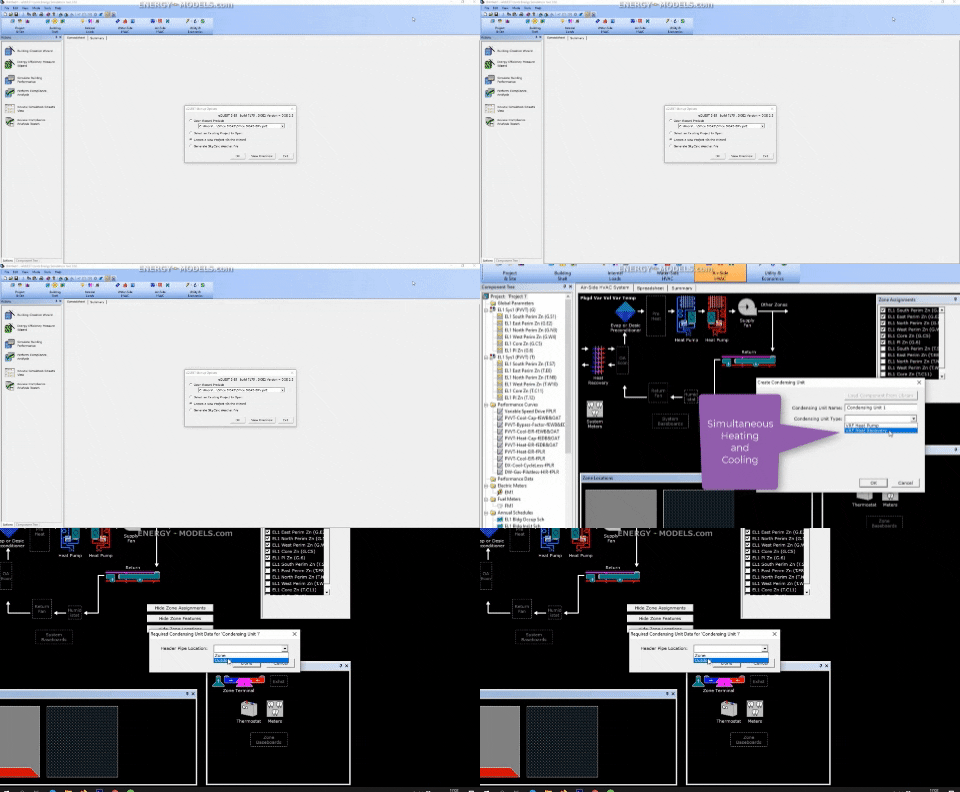
After many years of workarounds, eQUEST has the ability to model VRF systems. We're going to start modeling it the conventional way and then we have to set it up in the detailed mode. We're going to create a new project via the wizard, we can set weather information, this or that. Again, I'll select something that has four seasons, something like Chicago.
I'm not going to set up anything specific. I wanted to get to the HVAC system. I'm going to set it to system per floor. I want to do the way that we have done this in the past.
We set this up as a heat pump. The system type is packaged variable volume variable temperature also known as PVVT heat pump. Of course, there's other ways to do this but this is the conventional method that I've modeled this. There's nothing specific that I really need to set up here because we're going to override some things in the detailed mode.
From here, we're going to click finish. We have to switch the mode to detailed data edit. We're going to airside HVAC. One of the first things that we have to create is not quite obvious.
We want to right click somewhere on the systems at the top and that will give us an option to create a condensing unit. We have two choices, VRF heat pump and a VRF heat recovery condensing unit. The heat pump can provide heating or cooling in any given hour but not both. The recovery system can simultaneously provide heating and cooling.
Modeling VRF Systems
That's the difference between these two. We'll just select heat recovery. Right here, it's going to ask us the header pipe location. The refrigerant pipes end up having some thermodynamic significance in the E-Quest, not just where they're located due to heat transfer and things like that but also how long they are and the pressure drop.
Right here, for the first header pipe location, we can select outdoor. This of course would depend on your actual setup because these things do matter. That will prompt us to fill out some details on our condensing unit. This is a VRF heat recovery type.
You can see there's a number of inputs that we can go through and this would take forever to go through all of these. As I mentioned, there's the the leader pipe and the header pipe. There's even more pipes that we can define here. The leader piping is typically always outside.
The header pipe might run through a hallway. The leader pipe feeds the header pipe from the condensing units to the interior units. If we put this in a space, we would have to define which space to put that in. Right now, we can just assume these numbers are fine.
They have some crankcase heating things like that. One of the most difficult things to get information on for here are the unloading curves. We're not going to focus on any of that right now because we could spend hours talking about each and every one of these details. The main thing that we have is selecting the type.
Using the Documentation and Help Files
And then we have the number of systems. This is a multiplier. Have to look at the help file specifically for this. But it will set a limit on the maximum capacity per system for the interior units.
And you can see it says the number of outdoor units. Right now, we can just assume that this is one. Some of these inputs are interesting because eQUEST will override a number of things. It's probably most important to enter the max capacity per system correctly, so that you'll at least define your largest indoor units.
And then eQUEST will sort out the rest in terms of the number of units, you can enter the number of systems for eQUEST to override the maximum capacity per system. But if you define the maximum indoor unit capacity, you should be sitting in relatively decent shape, especially if your indoor units are similar in size. eQUEST isn't modeling exactly every indoor unit. Instead, it's doing some statistical analysis of what particular zones were at what load, and it determines your part load conditions.
And that will determine your relative efficiency. So one of the one of the biggest things here for this condensing unit is we want to define the capacity if we have that. If not, we'll leave that blank. We can set the ratio if just if we want to set over sizing, we can also do the same for heating.
The electric input ratio is going to define most of the energy consumption for this entire unit, including on the heating side. These units are typically defined by the cooling performance. And these numbers are calculated at certain rated temperatures. If you have the COP at a set of rated temperatures, that's what you'll want to fill out, you want to fill the inverse of the COP and then the actual rated temperatures.
DOAS Controls and Operating Logic
The same thing goes for heating. In the meantime, these defaults are pretty conventional. So we could just assume this and enter the general EIR, and we'd probably be in a pretty good situation. It's not going to be perfect, but it's going to be way better than anything we've done in the past.
So that sets up the condensing unit in terms of cooling and heating efficiency, and capacity, things like that, that doesn't actually implement the condenser unit into the system itself. And in order to do that, we have to select one of our PVVT systems. And note that of all these system types, the only two types that we will be able to model VRF in is the package variable volume variable temperature, and the DOAS. And that's it.
So the first step that we have to do is we have to go to heating, not cooling, go to heating first, and we'll select condensing unit. It'll ask us which condensing unit. And then again, it will ask us the pipe location, we select the zone here. It's going to ask us which zone.
And we can put it in, if there were a hallway zone, that would probably be it. You'd have to look at the system diagram. We'll just put it at a zone within the system, although that wouldn't always have to be true. We can't typically set them all to outdoors, as that's unlikely.
The zone entering temperatures were defaulted based on the wizard. I'm going to just restore default on that since we've changed some things. And this allows some warmer temperatures. Now, if we go to cooling, you can see that the cool source is set to NA, and the field is inactivated.
Modeling VRF Systems Continued
By selecting the condensing unit for the heat source, it automatically sets that condensing unit as the cool source. In fact, I've run multiple tests on this. And if we change the cooling efficiency under the system in this setup, that it will have no impact on the results. Most of these values are completely eliminated when we select the heating condensing unit.
However, some of them remain, and one of them that's confusing is the cooling EIR. As I said, I've changed this EIR, and it appears to have no impact on the final results at all. But that's all there is to setting up the VRF. There's a number of variables, but the first thing we have to do is we have to add a condenser, and we have to go to heating and a system set the system heat source to be the condensing unit.
Do not set the zone heat source to be a condensing unit. It appears to allow this. But if we simulate, we're going to get some bad components existing. That's going to fail simply because we set the zone heat source.
It's just the heat source that can be set to the condensing unit. And I believe that's everything to setting up the basics of the VRF unit. We'll talk some more about the details in upcoming lessons.
Practical Takeaway for Energy Modelers
This lesson provides practical guidance for modelers working with eQUEST, VRF Systems, Temperature Controls. Use this organized transcript as a reference while watching the video and applying the workflow inside eQUEST.