4.2 - Testing ERV with DOAS results in eQUEST DOE2.3
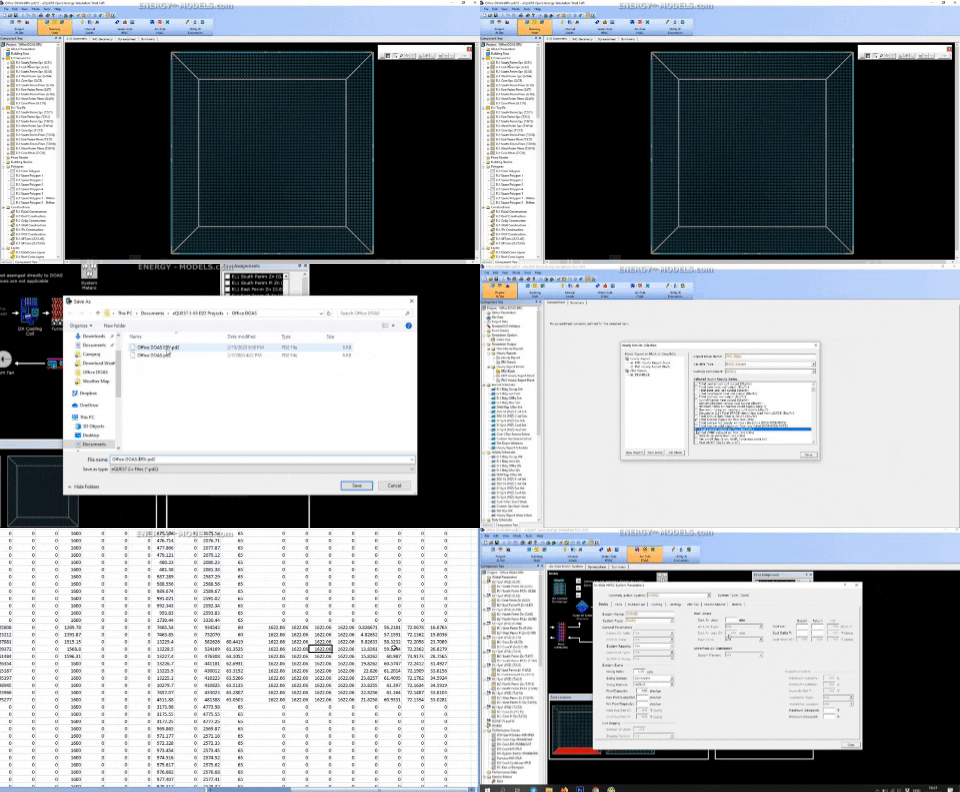
Subscriber Video Lesson
This page is paired with a full video lesson inside the subscription. Subscribers can watch the complete eQUEST walkthrough, including the on-screen setup, settings, and modeling workflow.
Script Preview
4B Testing ERV with DOAS results
Lesson summary: This transcript covers practical DOE 2.3, Dedicated Outdoor Air Systems, Energy Recovery Ventilation, Temperature Controls workflows for eQUEST energy modeling. The transcript has been organized with SEO-friendly headings and readable paragraph breaks so it can be posted with the corresponding training video.
Topics Covered in This Video
- DOE 2.3
- Dedicated Outdoor Air Systems
- Energy Recovery Ventilation
- Temperature Controls
- Practical energy modeling setup, review, and troubleshooting considerations
Introduction and Lesson Overview
Some of these features are new and we want to be able to verify that they work. We're going to test to see if it does work and I'm going to show you how to do that. The first thing, and we should have done this before, we're going to save as DOAS-ERV. If you notice, I already have DOAS-ERV that I don't want to overwrite.
I'm going to save that, continue. The first thing that we want to do is we have this outdoor setup. This is a pretty basic building so what we'll want to do is we'll want to inflate the outdoor air on one of our systems that has the dedicated outdoor air unit. I'm just going to do this with this one system just because that's all it will take.
We have the outdoor air is 18.2 CFM per person. I'm going to change this to 182 CFM so 10-fold just to exaggerate the impact of that and then what we're going to do is we want to look and make sure that there's people in that space otherwise that number will make no difference. We should really look at the building shell and it's just the EL1 CFM space and we can see that there's nine people in that space. There are indeed people and multiplying that by almost 200 is going to give us a pretty significant outdoor air on that space.
We will save our changes here and we'll go back to the airside HVAC. We added some outdoor air so that it would be a drastic change. The next thing that we want to do is just simply make a run that does not have dedicated outdoor air. You can do this by saving the file as.
Here we'll just simply make a parametric run create a parametric run no ERV there doesn't need to be a dash just left that in there for this file and then create a parametric component ERV off. Run type is going to be under a system HVAC system then now with the new engine we want to select DOAS here and we'll leave it for both of these. This isn't entirely intuitive if you've never done this we just have to turn this off so sometimes you could just save the file as and it might be easier to save it as and make the changes but we go to the first choice here. In general the choices that you'll see in the parametric runs will be in the same order so it was our first choice under the ERVs we selected the first category here and then we're going to select the first keyword here value is going to be no we're going to apply this to both of the systems just done now we can simulate and we have the baseline and then we have another parametric run that says no ERVs we're just going to simulate instead of looking at the detailed simulation output we're just going to look at standard results you can see I've already run one of these but this is what the hyphen was for look at the baseline with the ERV the heating is generally where an enthalpy will matter in this type of climate and then if we look at no ERV you can see interestingly the cooling went down slightly but the heating went way up as we would expect of course we greatly exaggerated the amount of outdoor air so that we could see this effect so we verified that there is a difference so something that we expect is happening the next thing we would want to do is verify that it's working at least along the lines that we think that it should be and the only way that I know how to verify that that's happening is through hourly reports so we would go to project and site hourly reports hourly report blocks we just open hourly reports I'm just going to make a new block ERV block the variable type is we only need to look at one of the DOAS units and we added all of the outdoor air to this DOAS 2 unit I'm going to click done and here I have the ERV block with just a simple variable entered I don't even need this but I need the block so that I can create a new report ERV report ERV details create from scratch and I will select the hourly reports schedule and then ERV block from here what we'll want to do is select some of the actual variables that we need I am going to select the first one and again there could be any particular set of details that you choose here to verify your answers but I'm going to pick the ones that I would pick one of the numbers that I want to know is the total system supply and the total system return airflow now again this is for the DOAS 2 unit and I'm going to scroll all the way down here and select with us some ERV details I want to know the outdoor airflow going in and the exhaust airflow going out through the wheel what else I want to verify is that there's a reasonable temperature change we have our effectiveness and so on but we did not enter anything specific we just use the defaults the effectiveness will change slightly based on on the what percent of the full load you're at but what I would want to know here just as a sanity check we could check the heat transfer things like that but more useful to me is the outdoor air temperature entering and the outdoor air temperature leaving notice this is to a mixed air plenum our return was actually to a duct if I see that option here in any case this will give us enough information to see that it's working and we'll look at the exhaust entering and the exhaust leaving in fact just looking at one of these would be good enough but we might as well look at all of them so we'll just click done here and now we need to resimulate just simulate both alternatives we actually don't need to view results here because we already looked at them nothing changed we just added the reports I'm just going to go to file export file overly results export both of them and then we'll ask if we want to open them first one I want to look at is the ERV details here that was the just random variable that we selected which gives us some idea actually of how the system is being controlled relative to our other discussion but what we want to see here is that the system supply and the system return these numbers are the same in many cases the system return air has been less than the system supply air for various reasons however what I've noted is that these numbers so this is the ERV outdoor airflow and the ERV exhaust airflow these seem to be exactly the same no matter what you run so when we showed the air flows before you may want to check this report if there's going to be somewhat of a difference if the numbers close it won't matter we're talking about fractions of a percentage but if the exhaust air flows going to be significantly different by more than 5% or so from the supply air you'll want to lock in whatever the maximum exhaust air is under under the EQuesta inputs so if we look here we can see these numbers now this is in January so it's quite cold and we see the entering and leaving and then leaving and entering and we see delta T's of some sort of value that we should see of course this is an enthalpy wheel so the delta T's are not the specific number that's changing it's the total enthalpy but this gives us a pretty good idea of what's changing without getting into too much detail and this does appear to be working we could check the math based on these numbers changing and these numbers changing but we'd probably have to look at the enthalpy totals to make sure that's perfect just from experience this looks to be what you would expect outdoor air entering very cold and leaving not quite as warm as the air coming from the plenum and that is it that is definitely working so the release notes for this version were correct that ERV is now enabled for dedicated outdoor air systems and we can feel confident running that the air flows I have noted in some iterations the two air flows going in and going out tend to be identical so you may want to limit those numbers to whatever the actual exhaust flow is you don't need to change anything these numbers were the supply and the return they're there but all the ERV flows should be zero because we turned it off obviously everything's off if we wanted to change the heat recovery exhaust air flows we could limit the CFM here in some runs you can run through those specific reports and you'll see that instead of in this case it was 1622 or something like that you may have return air of 1582 and you may want to specify the lower number for the exhaust air flow here so that the design would be different but here that's a minor detail and the judgment would be on your end and that's about that that is how you model DOAS with energy recovery
Practical Takeaway for Energy Modelers
This lesson provides practical guidance for modelers working with DOE 2.3, Dedicated Outdoor Air Systems, Energy Recovery Ventilation. Use this organized transcript as a reference while watching the video and applying the workflow inside eQUEST.