1 - eQUEST DOE 2.3
Subscriber Video Lesson
This page is paired with a full video lesson inside the subscription.
Subscribers can watch the complete eQUEST walkthrough, including the on-screen setup, settings, and modeling workflow.
Script Preview
1 - Starting DOE 2.3
Lesson summary: This transcript covers practical DOE 2.3, eQUEST, Dedicated Outdoor Air Systems workflows for eQUEST energy modeling. The transcript has been organized with SEO-friendly headings and readable paragraph breaks so it can be posted with the corresponding training video.
Topics Covered in This Video
- DOE 2.3
- eQUEST
- Dedicated Outdoor Air Systems
- Practical energy modeling setup, review, and troubleshooting considerations
Introduction and Lesson Overview
In this lesson, we're going to cover the long-awaited release of DOE 2.3. There's been enough time at this point where I'm comfortable showing some people how to use it as it required me to use the program myself for some time. You can see right here that I have eQUEST 365 and eQUEST 365.7175. This is 7173 version and this is 7175.
In the new releases, and I suppose for some time, they will now include the build number. Of course, as this video gets older, this build number is going to change and whatever the next build number is, it should be noted that this was a major update to eQUEST and as a result, this video should still be current, plus or minus, a few details for the foreseeable future. Most of you are just wondering how to use DOE 2.3 and we'll start with that and then we'll proceed to discuss some of the reasons why you should or should not use DOE 2.3. But in order to just keep the ball rolling, I'm just going to show you how to use it.
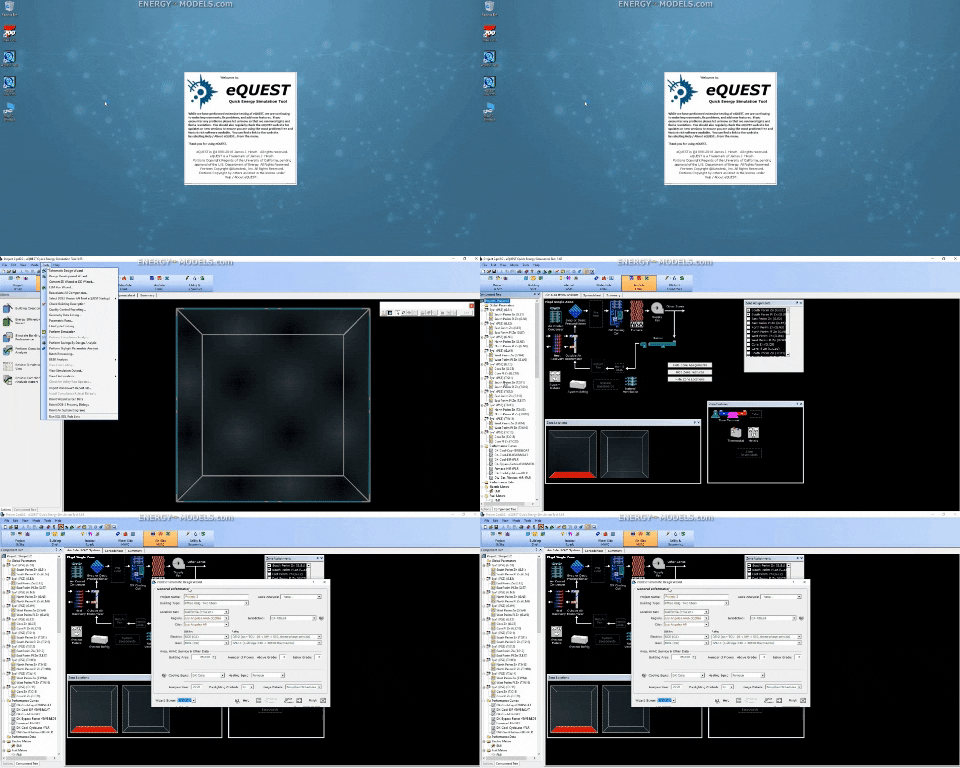
So we just open eQUEST 365.7175 build and you can see right here that it says DOE 2.2 equals DOE 2.2. I'm just going to create a new project via the wizard here. The reason is, is that the recent project in there was built with a different version of eQUEST and I just don't want to mess with that. It really shouldn't matter at this point for DOE 2.2, but I'm just creating a new project here.
See there's one of 43 screens in the SD wizard. I'm going to click finish here and just generate a project just normal. This is just standard conventional eQUEST 365. Nothing special.
So we have our project here. We're not going to look at that. What I wanted to get to, we go to the tools menu and we want to select DOE 2.2 version at next eQUEST startup. There's different ways you can do this.
Setting Up the DOE 2.3 Engine
This is the easiest way. This just edits the INI file if I'm not mistaken so that when you start an eQUEST session, it knows which engine to run. So we're going to hit DOE 2.3. There's a lot of important things that go along with this, but I know you all want to just rush into this.
So let's make sure that that's selected DOE 2.3 and I'm just going to close out of eQUEST. I don't need to save. This is just saving the file, not saving our settings. Now I'm going to reopen eQUEST, that initialization file is edited.
And right here we can see it's eQUEST 365 build number 7175, but the more important number here is Doe 2 version DOE 2.3. When I had mentioned opening a recent project, we can try that here and we just had that project too. And we can open that project. And there was nothing special about this project, but it should be noted that this is not backwards compatible.
Once you move to DOE 2.3, in theory you could convert it back into DOE 2.2 in a text editor and you would have to manually do that, which is a lot of work, but I would not recommend that to anyone who is really taking this training that needs training, because it's something that most anyone, besides people that use eQUEST every single day, would find intimidating and bigger time sink than just rebuilding most files. Now that said, let's look at what's new. There's a couple things that are new. The big thing is under the AirSight systems, let's go to Detailed Mode.
If we go to Create HVAC system, create from scratch, we can now add a dedicated outside air system. We're not going to do that, that's another lesson, but that's one of the big things. Before we get to that, and I'm going to make you listen to this, you can skip it I suppose, and I can't stop you from that, but there's several reasons not to use DOE 2.3. You're going to go to the help file here, and they have volume six new features.
Step-by-Step Transcript Notes, Part 3
Features not currently included in DOE 2.3. Note this is important. There's several subtopics. Some of the space and zone things we might find important, but as I've perused through this, the big thing is in the systems.
I'm going to go to type. The following system types are not currently implemented. You can see some of these are slated for implementation, and then there's some other notes on some of these systems. For example, that SZCI system, it hasn't been popular for over 40 years, so it's just not implemented, and they're probably not going to add that in the future because it's just not being used, and even in retrofits, those buildings have already been retrofitted.
For many of these, there are workarounds. The two biggest options here, and really, for me, it's one, is the PTAC. You may have PTACs with dedicated outside air, and you want to use DOE 2.3 because that seems the better option for the DOAS, and then you can't use PTACs. Of course, there's a workaround, and I suppose you could use single zone systems with a single zone in them and work around your PTACs.
That would be up to you, and that might be more difficult than doing the previous method for DOAS. The other one that a number of people use is the SUM system. The SUM is not even really an actual HVAC system. It's a diagnostic tool for you to get the total loads for any given system.
So, that's not available in this build. It's a diagnostic tool. There are other ways around that as well. However, PTACs are pretty nice to model as PTACs because you can set up a system, and each room gets its own PTAC automatically from the wizard, which is really nice.
Setting Up the DOE 2.3 Engine Continued
Again, it's slated for implementation, so 7177 may very well have the PTACs in this. Within the help file, there are some detailed descriptions on some of these new types. However, there's probably more information than you want in some of them, and this is up to you whether or not you go over these. I myself have gone over these, and that's why I'm giving you the highlight reel in the training right now.
So, that said, this is how you operate DOE 2.3. We should note that you cannot move backwards once you're in DOE 2.3. I can't stress that enough. When we look at the input files, there's a number of things that are just completely different.
The other thing we can quick check, switch back out of this mode. We'll go back to the wizard, and yes, that's fine. Let's go back to the SD wizard. We didn't change anything, so it's not a big deal.
There's still the 43 screens in here. Some of these things may be different. I thought I noted a few, but it's more than likely almost identical. I actually don't use the schematic design wizard typically.
I typically start with the design development wizard anyway. So, I just wanted to show that. We go into the design development wizard. This is just a standard warning.
DOAS Controls and Operating Logic
It's nothing unique to DOE 2.3. There's still seven screens under the HVAC system, and I don't believe that we can add dedicated outside air from this screen. I've confirmed that with some other people, but it seems like something that would be here. I believe there's for some additional economizer controls added here.
I can't recall if this is new or not, but there were some new economizer controls added in DOE 2.3 as well, and I would have to verify if any of these is new in this wizard. But for the most part, the wizard's the same, and the new features that you're going to be running are going to be implemented in the advanced or rather in the detailed mode. That's about it for why and why not. More so, we're covering the why not work in DOE 2.3, and that's again the system types that may not be there.
There were a list of things in systems that we covered. We did not cover the rooms nor the zone missing features, but most of those and like most of the systems are one, not things that you're going to have a problem with, and two, they're just not common enough to have to worry about work-arounds for a general modeler. That, of course, could be different for your unique situation. We'll try to get to that, but that's not a really high priority since every case will differ.
Finally, and we haven't calculated a model here, but when we run a model, there will be more error messages and we'll cover how to find some of the undefined error messages. We'll get an error message with just some sort of string of numbers instead of an actual description, and that's something that's just incomplete in DOE 2.3. The error messages do not have the nice descriptions on them that explain what triggered the error message or the warning in your .sim file. Okay, so I think that's everything for the introductory and for your cautionary statement as to why not to use DOE 2.3.
Currently, I am sticking mostly to DOE 2.2, but using DOE 2.3 more and more.
Practical Takeaway for Energy Modelers
This lesson provides practical guidance for modelers working with DOE 2.3, eQUEST, Dedicated Outdoor Air Systems. Use this organized transcript as a reference while watching the video and applying the workflow inside eQUEST.