4 - ERV Updates in eQUEST DOE2.3
Subscriber Video Lesson
This page is paired with a full video lesson inside the subscription. Subscribers can watch the complete eQUEST walkthrough, including the on-screen setup, settings, and modeling workflow.
Script Preview
4 ERV Updates
Lesson summary: This transcript covers practical DOE 2.3, Dedicated Outdoor Air Systems, Energy Recovery Ventilation workflows for eQUEST energy modeling. The transcript has been organized with SEO-friendly headings and readable paragraph breaks so it can be posted with the corresponding training video.
Topics Covered in This Video
- DOE 2.3
- Dedicated Outdoor Air Systems
- Energy Recovery Ventilation
- Practical energy modeling setup, review, and troubleshooting considerations
Introduction and Lesson Overview
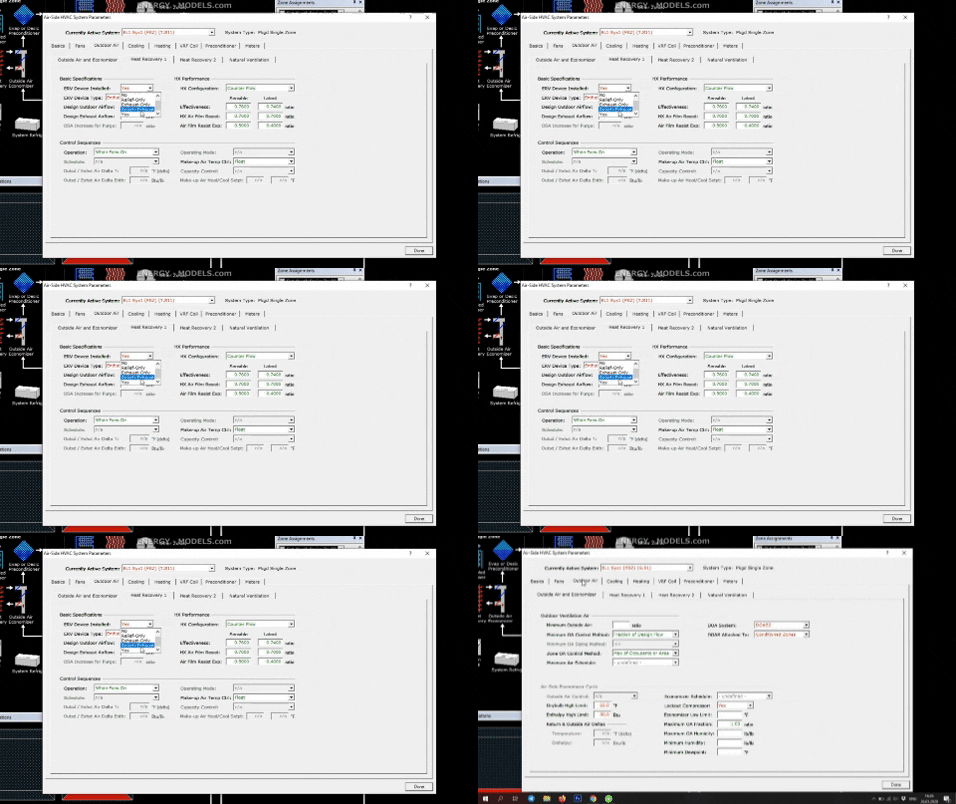
Before we discuss modeling energy recovery in the dedicated outside air system, we're just going to look at some of the changes made to the ERV units in the DOE 2.3 engine. If we open any system and we select outdoor air and we look at heat recovery one, oh it looks like I have to select a different system that does not have dedicated outside air. So I'll drop to the system and it looks like this one has dedicated outside air on it as well. This system does not so we can add an ERV to this one.
Go to heat recovery and now you can see that it says no under ERV device installed. You can click the drop down and we used to return an option of yes or no. Now we have the option of relief only also known as return air. We have the option for exhaust only in the case of separately ducted exhaust or room direct exhaust where exhaust heat is being recovered specifically and then we have the relief plus exhaust and that's in a conventional system all of the air is returned out of one duct and we can select that.
If we select yes, we'll be prompted to select the ERV type and we'll need to know some specifics if we select the heat exchanger. So I'm going to go ahead and just select a wheel, we're going to select an enthalpy wheel as is pretty common. When we select the enthalpy wheel, the heat exchanger performance will automatically be counterflow which is very common and my point here is that the effectiveness will automatically be filled in. If we select some other options, it may not fill in the effectiveness for sensible and in this case latent automatically.
So we would have to define that but the main point here is simply that we have these additional choices so that we can isolate specific air streams. Yes is equal to the relief plus exhaust so that's equal to the most typical case. However it's the old entry, most of us will forget and just select yes. We do have the ability to limit the air stream now to relief or exhaust only and so on.
As always it's important to consult the help file. If we go to item help, we can see the choices here. Like I said that yes is an obsolete entry equal to relief plus exhaust. What I want to point out here is that the exhaust only airflow specifies that the energy is recovered only from zonal exhaust fans.
Energy Recovery Ventilation Setup
Energy is not recovered from the mixed air relief airflow. So it's implied here that we have to have zonal exhaust in order to select this method. In one of the upcoming videos, we'll discuss how to test our energy recovery results to find out if we're recovering the full exhaust, just the zonal exhaust, how many CFM and so on.
Practical Takeaway for Energy Modelers
This lesson provides practical guidance for modelers working with DOE 2.3, Dedicated Outdoor Air Systems, Energy Recovery Ventilation. Use this organized transcript as a reference while watching the video and applying the workflow inside eQUEST.